
In the previous post, we learned how to create an OpenEmbedded (OE) workspace that can successfully build images for the Atmel AT91SAM2963-EK board. As it turns out, the default in OE is to build dataflash images for the AT91SAM9263-EK board, not nandflash. If your particular board uses dataflash for its storage, then you’re all set! But if your board is like mine and uses nandflash, we have a little more work to do first.
This post will focus on tweaking the OE tree to build nandflash images for the AT91SAM9263-EK and then finally uploading those images to the board. The result (with either dataflash or nandflash) will be to have Angstrom 2008.1 booting on the board.
Overview & Key Files
The result of the compile from the first post is a list of binary images:
# tree ~/workspace/tmp/deploy/glibc/images/at91sam9263ek/
/home/chris/workspace/tmp/deploy/glibc/images/at91sam9263ek/
|-- Angstrom-console-image-glibc-ipk-2009.X-test-20090809-at91sam9263ek-testlab/
|   |-- depends-nokernel-nolibc-noupdate-nomodules.dot
|   |-- depends-nokernel-nolibc-noupdate.dot
|   |-- depends-nokernel-nolibc.dot
|   |-- depends-nokernel.dot
|   |-- depends.dot
|   |-- files-in-image.txt
|   |-- installed-package-sizes.txt
|   `-- installed-packages.txt
|-- Angstrom-console-image-glibc-ipk-2009.X-test-20090809-at91sam9263ek.rootfs.jffs2
|-- at91bootstrap.bin -> at91sam9263ek-dataflashcardboot-2.10-r1.bin
|-- at91sam9263ek-dataflashcardboot-2.10-r1.bin
|-- console-image-at91sam9263ek.jffs2 -> Angstrom-console-image-glibc-ipk-2009.X-test-20090809-at91sam9263ek.rootfs.jffs2
|-- modules-2.6.28-r11-at91sam9263ek.tgz
|-- u-boot-at91sam9263ek-2009.01-r1.bin
|-- u-boot-at91sam9263ek.bin -> u-boot-at91sam9263ek-2009.01-r1.bin
|-- uImage-2.6.28-r11-at91sam9263ek.bin
`-- uImage-at91sam9263ek.bin -> uImage-2.6.28-r11-at91sam9263ek.bin
There are a few key files that we need going forward:
- at91bootstrap.bin. The AT91Bootstrap program is a very small bootloader produced by Atmel that does initial configuration of the hardware and passes off control to the next application. For our purposes, this next application will be U-boot, but with a few tweaks could pass control directly to the Linux kernel. As you can see from the tree above, this file is a symlink to
at91sam9263ek-dataflashcardboot-2.10-r1.bin. The “dataflashcardboot” string indicates which memory type this image supports. - u-boot-at91sam9263ek.bin. U-boot is the “universal bootloader” for embedded systems. It is a very feature-rich bootloader that offers both LCD and command line support — great for recovery purposes in the event that an in-field upgrade goes awry. Because the AT91SAM9263-EK requires the AT91Bootstrap program first, this is an optional but highly recommended component of your installation. While the name of the symlink’d file does not reveal whether it supports dataflash or nandflash, the default settings in OE result in this image supporting dataflash.
- uImage-at91sam9263ek.bin. This is a compressed version of the Linux kernel for use with U-boot. Once we get to the kernel, the distinction between dataflash and nandflash does not matter as much, though it is very likely that we will need to tweak the kernel’s configuration anyway. More on this later.
- console-image-at91sam9263ek.jffs2. The rest of the root filesystem is compressed as a JFFS2 image. This image holds the files related to the Angstrom distribution. The prefix of the filename (“console-image”) will match the
IMGparameter from themake imagecommand in the first post; remember that if noIMGparameter is given, the default value isconsole-image.
These four files comprise all of the support needed to boot Linux. If you have a board with dataflash, skip ahead to load the files onto the board. If you have a nandflash board, step through the OE tree modification process with me to build the files that we need.
The Machine Configuration File & U-boot
OE stores many of the definitions surrounding a board in machine configuration files. These are located in ~/workspace/openembedded/conf/machine. If you take a peek, you’ll notice there is an at91sam9263ek.conf file for our particular board. This is the file that needs to be modified to start the support of nandflash.
We are now faced with a question: how do we modify the file? Beyond the holy war of editor selection, remember that ~/workspace/openembedded is an active git repository. If we make changes inside the tree, future updates may clobber those changes. Hours of work get tossed away with a simple make update.
The answer is lies in our ~/workspace/local structure. BitBake supports the concept of Collections. These allow us (at runtime) to overlay our own files on top of the ones in the OE repository, but still keep the static structure of the files separate. Your workspace is already enabled with the concept; see the local.conf file from the first post.
We will need to mimick the OE structure slightly and copy the files that we want to modify:
# mkdir -p ~/workspace/local/conf/machine
# cp ~/workspace/openembedded/conf/machine/at91sam9263ek.conf \
     ~/workspace/local/conf/machine
At this point, fire up your favorite editor and modify ~/workspace/local/conf/machine/at91sam9263ek.conf so that it contains the changes in red below:
#@TYPE: Machine
#@Name: Atmel AT91SAM9263EK Development Platform
#@DESCRIPTION: Machine configuration for the at91sam9263ek development board with a at91sam9263 processor

TARGET_ARCH = "arm"
#PACKAGE_EXTRA_ARCHS = "armv4t armv5te"

PREFERRED_PROVIDER_virtual/kernel = "linux"
PREFERRED_VERSION_linux = "2.6.28"
PREFERRED_PROVIDER_xserver = "xserver-kdrive"

KERNEL_IMAGETYPE = "uImage"
UBOOT_MACHINE = "at91sam9263ek_nandflash_config"

PREFERRED_VERSION_at91bootstrap = "2.10"

#don't try to access tty1
USE_VT = "0"

MACHINE_FEATURES = "kernel26 alsa ext2 usbhost usbgadget screen touchscreen"
EXTRA_IMAGEDEPENDS += "u-boot"
EXTRA_IMAGEDEPENDS += "at91bootstrap"

# used by sysvinit_2
SERIAL_CONSOLE = "115200 ttyS0"
IMAGE_FSTYPES ?= "jffs2"
EXTRA_IMAGECMD_jffs2 = "--pad --little-endian --eraseblock=0x20000 -n"

require conf/machine/include/tune-arm926ejs.inc
At this point, you may be tempted to start making other changes. DON’T! Debugging an embedded system is difficult enough. Making too many changes at once can lead to some very long nights banging your head against the keyboard. Start small.
You may be wondering, “how did we know what to use for the UBOOT_MACHINE definition?” The answer lies in a combination of the U-boot recipe and source code. In the U-boot recipe (specifically ~/workspace/openembedded/recipes/u-boot/u-boot.inc), the compile process is initiated through the following process:
do_compile () {
        unset LDFLAGS
        unset CFLAGS
        unset CPPFLAGS
        oe_runmake ${UBOOT_MACHINE}
        oe_runmake all
}
We see here that when OE runs automake inside the U-boot build tree, it passes the UBOOT_MACHINE variable verbatim. When we look at the Makefile in the U-boot source tree (~/workspace/tmp/work/at91sam9263ek-angstrom-linux-gnueabi/u-boot-2009.01-r1/u-boot-2009.01/Makefile), we can see that several targets are supported for the AT91SAM9263-EK board:
at91sam9263ek_nandflash_config \
at91sam9263ek_dataflash_config \
at91sam9263ek_dataflash_cs0_config \
at91sam9263ek_config    :       unconfig
        @mkdir -p $(obj)include
        @if [ "$(findstring _nandflash,$@)" ] ; then \
                echo "#define CONFIG_SYS_USE_NANDFLASH 1"       >>$(obj)include/config.h ; \
                $(XECHO) "... with environment variable in NAND FLASH" ; \
        else \
                echo "#define CONFIG_SYS_USE_DATAFLASH 1"       >>$(obj)include/config.h ; \
                $(XECHO) "... with environment variable in SPI DATAFLASH CS0" ; \
        fi;
        @$(MKCONFIG) -a at91sam9263ek arm arm926ejs at91sam9263ek atmel at91
So at this point, rebuilding U-boot would create a version that supported nandflash. (We’re going to hold off on rebuilding at the moment and just do everything in one fell swoop.)
AT91Bootstrap
OE contains recent versions of AT91Bootstrap (v2.x and later). Unfortunately, these versions appear to be broken for use with nandflash. (Many thanks to Marcin Juszkiewicz for pointing that out! His one sentence answer ended my hours of banging a head against the table.) To work around the issue, we will add a new recipe for AT91Bootstrap v1.14.
First, create the directory to hold our new recipe:
# mkdir -p ~/workspace/local/recipes/at91bootstrap
Next, create a file named at91bootstrap_1.14.bb in this directory. You can either download the file or create it youself. The file should contain the following:
DESCRIPTION = "at91bootstrap: loaded into internal SRAM by AT91 BootROM"
SECTION = "bootloaders"
PR = "r0"

SRC_URI = " \
     ftp://www.linux4sam.org/pub/at91bootstrap/AT91Bootstrap${PV}.zip \
"

S = "${WORKDIR}/Bootstrap-v${PV}"
PACKAGE_ARCH = "${MACHINE_ARCH}"
EXTRA_OEMAKE = "CROSS_COMPILE=${TARGET_PREFIX} DESTDIR=${DEPLOY_DIR_IMAGE} REVISION=${PR}"

AT91BOOTSTRAP_MEDIA ?= "nandflash"

do_compile () {
     unset LDFLAGS
     unset CFLAGS
     unset CPPFLAGS

     rm -Rf ${S}/board/${MACHINE}/${AT91BOOTSTRAP_MEDIA}/${AT91BOOTSTRAP_MEDIA}_${MACHINE}.bin
     rm -Rf ${S}/board/${MACHINE}/${AT91BOOTSTRAP_MEDIA}/${AT91BOOTSTRAP_MEDIA}_${MACHINE}.elf
     rm -Rf ${S}/board/${MACHINE}/${AT91BOOTSTRAP_MEDIA}/${AT91BOOTSTRAP_MEDIA}_${MACHINE}.map
     oe_runmake -C ${S}/board/${MACHINE}/${AT91BOOTSTRAP_MEDIA} AT91_CUSTOM_FLAGS="${AT91BOOTSTRAP_FLAGS}" rebuild
}

do_install () {
     install -d ${DEPLOY_DIR_IMAGE}
     install -m 0755 \
          ${S}/board/${MACHINE}/${AT91BOOTSTRAP_MEDIA}/${AT91BOOTSTRAP_MEDIA}_${MACHINE}.bin \
          ${DEPLOY_DIR_IMAGE}/${MACHINE}-${AT91BOOTSTRAP_MEDIA}boot-${PV}-${PR}.bin
     rm -Rf ${DEPLOY_DIR_IMAGE}/at91bootstrap.bin
     cd ${DEPLOY_DIR_IMAGE} \
          && ln -sf ${MACHINE}-${AT91BOOTSTRAP_MEDIA}boot-${PV}-${PR}.bin at91bootstrap.bin
}
The AT91BOOTSTRAP_MEDIA variable allows us to define the flash type (dataflash or nandflash) used on the machine in the machine configuration file. The follow-up step, therefore, is to modify ~/workspace/local/conf/machine/at91sam9263ek.conf to include this definition:
#@TYPE: Machine
#@Name: Atmel AT91SAM9263EK Development Platform
#@DESCRIPTION: Machine configuration for the at91sam9263ek development board with a at91sam9263 processor

TARGET_ARCH = "arm"
#PACKAGE_EXTRA_ARCHS = "armv4t armv5te"

PREFERRED_PROVIDER_virtual/kernel = "linux"
PREFERRED_VERSION_linux = "2.6.28"
PREFERRED_PROVIDER_xserver = "xserver-kdrive"

KERNEL_IMAGETYPE = "uImage"
UBOOT_MACHINE = "at91sam9263ek_nandflash_config"
AT91BOOTSTRAP_MEDIA = "nandflash"

PREFERRED_VERSION_at91bootstrap = "1.14"

#don't try to access tty1
USE_VT = "0"

MACHINE_FEATURES = "kernel26 alsa ext2 usbhost usbgadget screen touchscreen"
EXTRA_IMAGEDEPENDS += "u-boot"
EXTRA_IMAGEDEPENDS += "at91bootstrap"

# used by sysvinit_2
SERIAL_CONSOLE = "115200 ttyS0"
IMAGE_FSTYPES ?= "jffs2"
EXTRA_IMAGECMD_jffs2 = "--pad --little-endian --eraseblock=0x20000 -n"

require conf/machine/include/tune-arm926ejs.inc
One final step needs to take place before the AT91Bootstrap recipe is complete. In the SRC_URI variable, we’ve specified a new file to download, one which OE has never before seen. For security reasons, one of the checks that OE performs before uncompressing source code is to check the MD5/SHA256 checksum of the compressed version to ensure that the content matches what is expected. So we need to teach OE about this file.
Create a new file at ~/workspace/local/conf/checksums.ini that contains the following:
[ftp://www.linux4sam.org/pub/at91bootstrap/AT91Bootstrap1.14.zip]
md5=2942f22a101d61a34aaf48b0f6b88cba
sha256=90bfc6ecc53a3ee7bb5a3eb33bae3f8fd768165570046d92bb47462f629bdd11
(The blank line at the end is important. More on this in later posts.)
Once the recipe exists, the checksum data is added to the approved list, and the machine configuration file is updated, we’re ready to begin our build.
Rebuilding AT91Bootstrap and U-boot
After the steps from the previous sections have been completed, we’re now ready to build both AT91Bootstrap and U-boot. The following two commands accomplish this task:
# cd ~/workspace
# make bb PACKAGE="at91bootstrap u-boot" CMD="-c clean"
# make bb PACKAGE="at91bootstrap u-boot"
Note how the first make command overrides the command passed to BitBake, telling it to clean the existing builds off the system. The second make command then tells BitBake to regenerate the builds.
Looking at our images tree, we now see the new files:
# tree --dirsfirst -F ~/workspace/tmp/deploy/glibc/images/at91sam9263ek/
/home/chris/workspace/tmp/deploy/glibc/images/at91sam9263ek/
|-- Angstrom-console-image-glibc-ipk-2009.X-test-20090809-at91sam9263ek-testlab/
|   |-- depends-nokernel-nolibc-noupdate-nomodules.dot
|   |-- depends-nokernel-nolibc-noupdate.dot
|   |-- depends-nokernel-nolibc.dot
|   |-- depends-nokernel.dot
|   |-- depends.dot
|   |-- files-in-image.txt
|   |-- installed-package-sizes.txt
|   `-- installed-packages.txt
|-- Angstrom-console-image-glibc-ipk-2009.X-test-20090809-at91sam9263ek.rootfs.jffs2
|-- at91bootstrap.bin -> at91sam9263ek-nandflashboot-1.14-r0.bin*
|-- at91sam9263ek-nandflashboot-1.14-r0.bin*
|-- console-image-at91sam9263ek.jffs2 -> Angstrom-console-image-glibc-ipk-2009.X-test-20090809-at91sam9263ek.rootfs.jffs2
|-- modules-2.6.28-r11-at91sam9263ek.tgz
|-- u-boot-at91sam9263ek-2009.01-r1.bin*
|-- u-boot-at91sam9263ek.bin -> u-boot-at91sam9263ek-2009.01-r1.bin*
|-- uImage-2.6.28-r11-at91sam9263ek.bin
`-- uImage-at91sam9263ek.bin -> uImage-2.6.28-r11-at91sam9263ek.bin
Programming the AT91SAM9263-EK Board
IF USING DATAFLASH: The Tcl script and ubootEnvtFileNandFlash.bin below have been optimized for nandflash. They will not behave properly with boards that use dataflash. I will try to post instructions on how to get dataflash working later, but for now, you may have to tweak things on your own.
Once we have the appropriate dataflash/nandflash versions of the binary images, we are ready to upload the images to the AT91SAM9263-EK board. To assist with this process, we will need two files. You can either download them or create them yourself:
~/workspace/tmp/deploy/glibc/images/at91sam9263ek/load_flash.bat
sam-ba.exe \usb\ARM0 AT91SAM9263-EK load_flash.tcl > logfile.log 2>&1
notepad logfile.log
~/workspace/tmp/deploy/glibc/images/at91sam9263ek/load_flash.tcl
#
# Derived from at91sam9263ek_demo_linux_nandflash.tcl
# Copyright (c) 2008 Atmel Corporation.
#

################################################################################
#  proc uboot_env: Convert u-boot variables in a string ready to be flashed
#                  in the region reserved for environment variables
################################################################################
proc set_uboot_env {nameOfLstOfVar} {
    upvar $nameOfLstOfVar lstOfVar

    # sector size is the size defined in u-boot CFG_ENV_SIZE
    set sectorSize [expr 0x20000 - 5]

    set strEnv [join $lstOfVar "\0"]
    while {[string length $strEnv] < $sectorSize} {
       append strEnv "\0"
    }
    # \0 between crc and strEnv is the flag value for redundant environment
    set strCrc [binary format i [::vfs::crc $strEnv]]
    return "$strCrc\0$strEnv"
}

################################################################################
#  Main script: Load the linux demo in NandFlash
#               Update the environment variables
################################################################################
set bootstrapFile       "at91bootstrap.bin"
set ubootFile           "u-boot-at91sam9263ek.bin"
set ubootEnvFile        "ubootEnvtFileNandFlash.bin"
set kernelFile          "uImage-at91sam9263ek.bin"
set rootfsFile          "console-image-at91sam9263ek.jffs2"

## NandFlash Mapping
set bootStrapAddr       0x00000000
set ubootAddr           0x00020000
set ubootEnvAddr        0x00060000
set kernelAddr          0x00200000
set rootfsAddr          0x00400000

# u-boot variable
set kernelUbootAddr     0x00200000
set kernelLoadAddr      0x22200000

## NandFlash Mapping
set kernelSize    [format "0x%08X" [file size $kernelFile]]

lappend u_boot_variables \
 "ethaddr=3a:1f:34:08:54:54" \
 "bootdelay=3" \
 "baudrate=115200" \
 "stdin=serial" \
 "stdout=serial" \
 "stderr=serial" \
 "bootargs=mem=64M console=ttyS0,115200 root=/dev/mtdblock1 rw rootfstype=jffs2" \
 "bootcmd=nand read $kernelLoadAddr $kernelUbootAddr $kernelSize; bootm $kernelLoadAddr"

puts "-I- === Initialize the NAND access ==="
NANDFLASH::Init

puts "-I- === Erase all the NAND flash blocs and test the erasing ==="
NANDFLASH::EraseAllNandFlash

puts "-I- === Load the bootstrap: nandflash_at91sam9-ek in the first sector ==="
NANDFLASH::sendBootFile $bootstrapFile

puts "-I- === Load the u-boot in the next sectors ==="
send_file {NandFlash} "$ubootFile" $ubootAddr 0

puts "-I- === Load the u-boot environment variables ==="
set fh [open "$ubootEnvFile" w]
fconfigure $fh -translation binary
puts -nonewline $fh [set_uboot_env u_boot_variables]
close $fh
send_file {NandFlash} "$ubootEnvFile" $ubootEnvAddr 0

puts "-I- === Load the Kernel image ==="
send_file {NandFlash} "$kernelFile" $kernelAddr 0

puts "-I- === Load the linux file system ==="
send_file {NandFlash} "$rootfsFile" $rootfsAddr 0
(Feel free to change the ethaddr and baudrate settings if your setup needs it.)
Download the ubootEnvtFileNandFlash.bin file and place it in ~/workspace/tmp/deploy/glibc/images/at91sam9263ek/. This file has been provided by Atmel (along with the original versions of the .bat and .tcl files above) to assist in the flashing of the board. The Tcl file overwrites certain parameters before writing the contents to the ENV sector of flash.
To illustrate how this Tcl script works, let’s take a look at the memory map (derived from http://www.linux4sam.org/twiki/pub/Linux4SAM/GettingStarted/demo_nandflash_map.png):

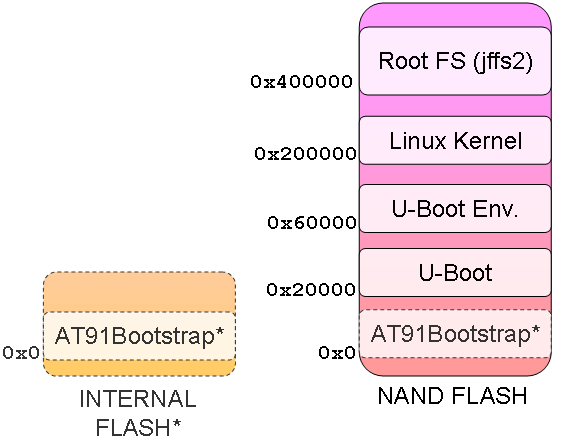
AT91SAM9263-EK Memory Map for NandFlash
The addresses on the left side of each box are memory locates in the nandflash. AT91Bootstrap is loaded first at address 0x0. U-boot follows at address 0x20000, with its environment close behind at address 0x60000. (A redundant environment is stored at address 0x80000, but nothing needs to get loaded for this.) The Linux kernel itself is way up at address 0x200000, with the root filesystem coming last at address 0x400000.
Later, we will investigate what to do if you want to change these address, but let’s leave them be for now.
The final tool in this puzzle is the Atmel AT91 In-system Programmer (ISP). The current version as of this writing is v1.13 for Windows XP/Vista and Linux. Download the install package for your operating system from the Atmel website and run through the setup. The AT91 ISP installs several utilities, one of which is named SAM-BA. This program will be used to continue the flashing operation.
The next few steps will use Windows XP as the example system that is used to flash the board. The process can be easily adopted for your particular operating system.
Follow the below steps to flash the Atmel AT91SAM9263-EK board:
- Power off the board.
- Connect a USB cable from your computer to port J18 (USB device interface) on the AT91SAM9263-EK board.
- Open (remove) jumper
J29(NANDCS). - Power on the board.
- Wait for your computer to recognize the AT91SAM9263-EK as a new USB device. Install any drivers that it recommends using.
- Close (add) jumper
J29(NANDCS). - Run
load_flash.bat. Wait until the Notepad window appears. - Close Notepad.
- Momentarily press the SPST switch
BP3(RESET) to power cycle the board.
At this point, if you have a serial console connected to J14 (SERIAL DEBUG PORT) with the settings 115200 8-N-1 (no flow control), you should see the following sequence:
RomBOOT
>

U-Boot 2009.01 (Aug 09 2009 - 07:07:28)

DRAM:  64 MB
NAND:  256 MiB
In:    serial
Out:   serial
Err:   serial
Net:   macb0
macb0: Starting autonegotiation...
macb0: Autonegotiation timed out (status=0x7849)
macb0: link down (status: 0x7849)
Hit any key to stop autoboot:  0

NAND read: device 0 offset 0x200000, size 0x1d722c
 1929772 bytes read: OK
## Booting kernel from Legacy Image at 22200000 ...
 Image Name:   Angstrom/2.6.28/at91sam9263ek
 Image Type:   ARM Linux Kernel Image (uncompressed)
 Data Size:    1929708 Bytes =  1.8 MB
 Load Address: 20008000
 Entry Point:  20008000
 Verifying Checksum ... OK
 Loading Kernel Image ... OK
OK

Starting kernel ...

Uncompressing Linux.............................................................
........................................ done, booting the kernel.
[    0.000000] Linux version 2.6.28 (chris@headnut.org) (gcc version 4.3.3 (GCC)) #1 PREEMPT Sun Aug 9 02:14:09 PDT 2009
[    0.000000] CPU: ARM926EJ-S [41069265] revision 5 (ARMv5TEJ), cr=00053177
[    0.000000] CPU: VIVT data cache, VIVT instruction cache
[    0.000000] Machine: Atmel AT91SAM9263-EK
[    0.000000] Ignoring unrecognised tag 0x54410008
[    0.000000] Memory policy: ECC disabled, Data cache writeback
[    0.000000] Clocks: CPU 199 MHz, master 99 MHz, main 16.367 MHz
[    0.000000] Built 1 zonelists in Zone order, mobility grouping on.  Total pages: 16256
[    0.000000] Kernel command line: mem=64M console=ttyS0,115200 root=/dev/mtdblock1 rw rootfstype=jffs2
[    0.000000] AT91: 160 gpio irqs in 5 banks
[    0.000000] PID hash table entries: 256 (order: 8, 1024 bytes)
[    0.000000] PID hash table entries: 256 (order: 8, 1024 bytes)
...[snipped]...
If your screen looks like above, congratulations! You have modified the default OE workspace and successfully built a nandflash version of images for the Atmel AT91SAM9263-EK.
If things are not working, step back through these instructions and double check everything. You can try removing ~/workspace/tmp/ and restarting the entire build process from make. This will sometimes work as items are not always cleared out of the BitBake cache properly. If none of these suggestions help, there will be additional information on debugging embedded systems posted later.
Once you have a working system, you will be very tempted to start modifying things. The next post will talk about exactly that.